Category: Tech Tips

  • Basic video editing proc

    Basic video editing proc

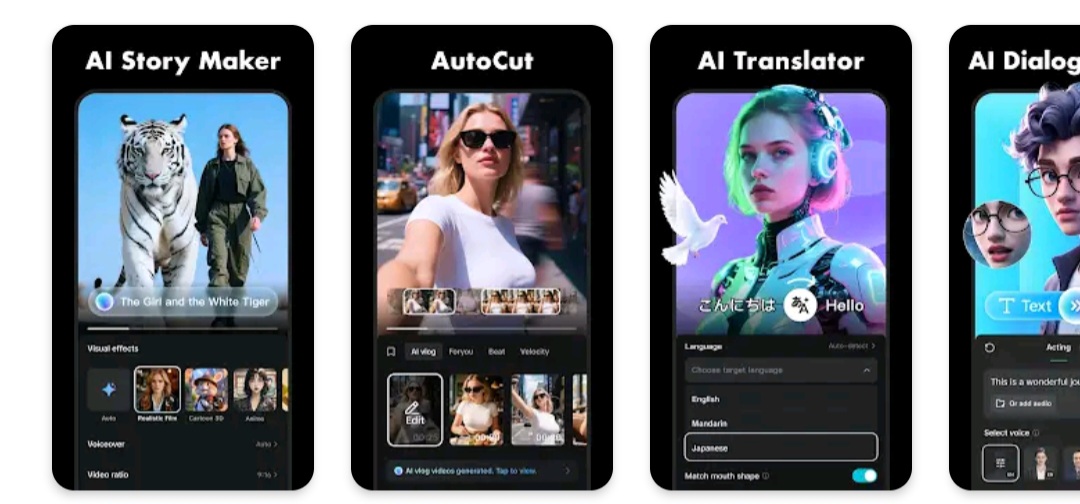
    CapCut offers easy-to-use video editing functions, in-APP fonts and effects, advanced features such as keyframe animation, smooth slow-motion, chroma key, and stabilization, to help you capture and snip moments.

    Create fancy videos with other unique features: auto captions, text-to-speech, motion tracking, and background removal. Show your personality and go viral on TikTok, YouTube, Instagram, WhatsApp, and Facebook!

    FEATURES
    Basic video editing

    • Trim and shorten clips and split or merge videos.
    • Adjust video speed from 0.1x to 100x, and apply speed curves to clips.
    • Animate video clips with incredible zoom in/out effects.
    • Highlight the best moments with the freeze feature.
    • Explore transition options with awesome effects on and between clips.

    Advanced video editor

    • Keyframe video animation is available for all settings.
    • Edit videos to create smooth slow-motion with the optical flow feature and speed curve tool.
    • Use the chroma key to remove specific colors from videos.
    • Easy to arrange and preview clips on multi-track timeline.
    • The stabilizing feature keeps video footage steady.

    Intelligent features

    • Auto captions: automate speech recognition and subtitles in videos.
    • Text-to-speech: apply text-to-speech in multiple languages and voices.
    • Background removal: automatically remove backgrounds.

    Text & Stickers

    • Add text to videos with different fonts and styles, choose unique text templates. Fonts can be imported locally.
    • Subtitles can be added to the timeline of video tracks and can be moved and adjusted in one step.

    Trending Effects & Filters

    • Match video content with diverse filters that are updated weekly with the latest trends.
    • Edit videos with hundreds of trending effects, including Glitch, Blur, 3D, etc.
    • Add movie-style video filters or adjust video brightness, contrast, etc.

    Music & Sound Effects

    • Add millions of music clips and sound effects to videos.
    • Extract audio, clips, and recordings from videos.

    Easy to Share

    • Custom video export resolution, HD video editor supports 4K 60fps exports and smart HDR.
    • Adjust the format and share with your friends on social media platforms.

    CapCut is an all-in-one video editor and video maker application with everything you need to create stunning, high-quality videos. Beginners can get started with CapCut in a matter of seconds, while advanced users can enjoy all the functions they need to edit videos.
    Get it now

  • ANSWER_PHONE_CALLS: Answer GG2

    ANSWER_PHONE_CALLS: Answer GG2

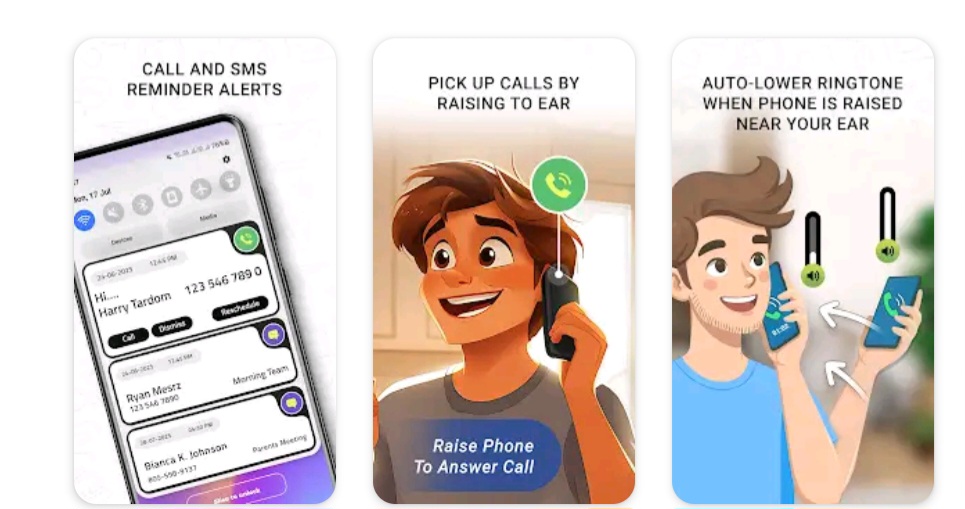
    When you put your phone close to your ear, the app answers calls automatically.

    The app automatically answers calls when you hold your phone up to your ear.
    Additionally, it lets you shake the phone to reject calls
    You can also set setting for shake sensor value.
    Blinks the flashlight when a call comes in.
    Furthermore, you have the ability to schedule calls and get alerts for them and from alert yo can go phone system call app where you can call particular person easily.
    Furthermore, you have the ability to schedule sms and get alerts for them and from alert yo can go phone system sms app where you can sms particular person easily.

    Required Permissions:

    ANSWER_PHONE_CALLS: Answer incoming calls.
    FOREGROUND_SERVICE_PHONE_CALL & FOREGROUND_SERVICE_SPECIAL_USE:

    Foreground service is used for raise your phone to answer call without any button click in background and foreground.
    If permission is not enabled then app core feature will not work in latest devices.

    Note: We strictly maintain user privacy.
    We are not storing any of user data for our personal use.

    Get it Now

  • your device’s back camera to create CBT

    your device’s back camera to create CBT

    Transform your device with the amazing Transparent Wallpaper app. Discover a marvel in mobile technology! This innovative app introduces a Transparent Live Wallpaper that uses your device’s back camera to create an illusion of a see-through screen. It’s like having a window right on your device, offering a unique and immersive experience unlike any other!

    🌟 Transparent Screen Live Wallpaper Key Features 🌟

    βœ… Experience a more authentic, transparent effect than any other app.
    βœ… User-friendly interface: Easy and intuitive to use.
    βœ… Smooth performance: Enjoy a seamless and fluid experience.
    βœ… High-resolution visuals: Crystal-clear display for an enhanced view.

    Easy setup:
    πŸ‘‰ Open the “Transparent Live Wallpaper” app.
    πŸ‘‰ Choose the camera you prefer, front or back.
    πŸ‘‰ Tap on ‘Set Live Wallpaper’ to activate.
    πŸ‘‰ On the preview screen, confirm by clicking on ‘set live wallpaper’.

    πŸš€ Why Choose Transparent Live Wallpaper? πŸš€

    Our app is globally recognized for its innovative approach and stunning visual effects. It’s not just wallpaper; it’s a whole new way to interact with your device. You’ll be amazed at how it transforms your phone or tablet into a transparent background, offering a glimpse of the world behind it.

    πŸ”₯ Ready to Elevate Your Device? πŸ”₯
    Download the Transparent Screen – Wallpaper App now and join the worldwide community of users who are already enjoying this cutting-edge technology. Say goodbye to ordinary backgrounds and hello to a fascinating, transparent world!

    πŸ‘‰ Tap Download and start a journey with your new Transparent Live Wallpaper today!

    Get it now

  • My phone does not have magnetic sensor CC1

    My phone does not have magnetic sensor CC1

    Detect hidden spy cams and listening devices. Trusted by millions

    * Our response via comments goes to update section of your gmail app*
    Detect Hidden spy camera using hidden camera detector app :

    Magnetometer feature need to have magnetic sensor in your phone, other wise this feature will not work.

    How to use this app. How to find camera ?
    Move app near to any device that you have doubt. For example – shower, flowerpot, lens looking part or changing room mirror.

    This app analyse the magnetic activity around the device. If magnetic activity seems similar to that of camera, this app will beep and raise alarm for you so that you can further investigate.

    You have to move app facing your sensor towards the object.To know sensor position of your phone, have any camera and move nearby top of your phone and bottom of your phone. When it beeps, you find the sensor position

    Infrared camera detector – This app has one more tool which is detect infrared lights.Just open the infrared detector and scan for white light that appear on screen but not visible by naked eye. Such white light indicate infrared light.It could be infrared camera. Your normal cam can also detect it but what we have is inbuilt feature with luminescence effect.

    What less, get some easy techniques that can save you from potential exposure to hidden camera.
    You can share the location with friends easily if you find the camera so that they can take precaution when they visit this place.

    If app crashes, for Infrared detector, please close other camera apps and try again.
    Do rate us and for any issues write to futureappstech@gmail.com

    FAQ

    My phone does not have magnetic sensor –
    This app analyse magnetic activity based on readings from magnetic sensor of your android device. If this sensor is not available, you can only use infrared detector feature. Other way is you can try on some other device having magnetic sensor.

    App beeps near metal or electronics –
    This app is not designed to detect metals. Metals are good conductor for electricity so they have electromagnetism but it is very weak and app is designed to ignore it.
    But sometimes, some type of metals depending on their length, material, temperature may exhibit same magnetic activity as that of camera. In that case app may beep. If so always look for lens on the suspect if app beeps.

    What do I do if it beeps near metal –
    Check if there is any lens on the suspect. If not, then you are secure. if you find lens like object, then there should be hidden camera.

    What is the use of this app, if I have to detect manually
    App analyses magnetic activity and warn you if it find magnetic activity similar to camera.
    So if app beeps, check for lens.
    App can not see if suspect is having lens on it but your eyes can see it likewise you can not see its magnetic/ electromagnetic activity but the app can analyze ! App will help you many times and may also fail sometimes and there it needs your intervention.

    Infrared detector is just a fancy green tool of normal camera. Normal camera can also detect infrared
    You are partially-correct. Along with this, infrared detector have luminescence effect to glow white light. If you feel better with normal camera, go for it. We never claimed something false. But please give credit to the app if you never knew IR camera can be detected using digicam. And off course, its a quick scanning feature within the app.

    App does not open Infrared camera detector. It shows not responding
    Please kill all other camera apps that are running in background

    Download

  • Advanced video editor FPS

    Advanced video editor FPS

    Pro Video Editor with Music! Edit video with effects, slideshow & slow motion

    InShot – Powerful all-in-one Video Editor and Video Maker with professional features. Add music, transition effects, text, emoji, keyframe, slow motion, make video collage, blur background and etc! As an easy-to-use editing app, InShot helps you record every precious moments of daily life.

    Top video maker with music, helps you create fancy video with ease and be an influencer on YouTube, Instagram, TikTok, WhatsApp, Facebook, etc.

    InShot is also a easy-to-use photo editor. Edit pictures and selfie, remove photo background and make photo cutouts, make photo collages and add text and stickers. Make stories for Instagram.

    Features:

    Basic video editing
    * Trim and cut videos. Split one video into several clips.
    * Merge videos. Merge multiple clips into one. Combine and compress video without losing quality.
    * Crop. Cut out the unwanted parts of the screen.
    * Adjust ratio. Fit your video and photo in any aspect ratio.
    * Adjust speed. From 0.2x to 100x. Support speed ramping and make smooth slow motion.
    * Reverse. Rewind the clip.
    * Make photo slideshows. And you can also make stop motion video.

    Advanced video editor
    * Keyframes. Add keyframe animations to text, stickers, and PIPs.
    * Picture-in-Picture (PIP). Add video and photo layers above the clip. Make video collage easily.
    * Chroma key. Removes the selected color. You can use this tool to create green screen videos.
    * Mask. Add a shape mask to the PIP.
    * Mixtures. Blend your video with blend mode.
    * Color picker. Pick any color on the screen and apply it to the background/text.
    * Voice changer. Add voice effect to clip and voice-over, make video editing more fun.

    Music, effects & voice-over
    * Vlog music video maker. Add InShot featured music or use your own music.
    * Extract audio from video.
    * Lots of sound effects.
    * Add voice-over. Support adding voice effect and make the voiceover more diverse.
    * Adjust music volume and music fade in/out option.

    Filters & Effects
    * Add movie style video filters and full effects such as VHS, Glitch effect, stop motion, Retro, RGB, etc.
    * Adjust video brightness, contrast, saturation, etc. Customized video filters and video effects.
    * Pro editing app with 60+ awesome transitions. Combine two clips with transition effects.

    Text & Stickers
    * Add text to videos and photos. Many fonts are available. Add subtitles for your vlog.
    * Add animated stickers and emoji. Various and unique stickers. Aesthetics, doodle, birthdays, neon, etc.
    * Edit the text and stickers with keyframe animation effects.
    * Add custom memes and images to videos and photos.

    Canvas & Background
    * Various background patterns. And you can also upload your own pictures as a background.
    * Adjust video ratios. 1:1 for Instagram, 9:16 for TikTok and 16:9 for YouTube.

    Photo Editor & Collage
    * Add background to your photos.
    * Multiple ratios supported. Cute frame.
    * 1000+ stickers, add funny memes to your photos.
    * Create photo collages. Lots of stylish collage layouts available.

    Easy to Export & Share
    * HD pro video editor for YouTube. Support exporting videos in 4K, support exporting videos incustom resolution.
    * Share your daily life to others on social media and get more likes and followers. Instagram, TikTok, Whatsapp, etc.

    InShot is an editing app for videos and photos. With InShot, you can easily make basic video and even advanced assets like video collage, smooth slow motion, stop motion and more. You can share your vlogs to social media to get more likes, or edit video with music and pic for TikTok.

    Get it now

  • Create and collaborate on immersive, GRS

    Create and collaborate on immersive, GRS

    Create and collaborate on immersive, data-driven maps from anywhere, with the new Google Earth. See the world from above with high-resolution satellite imagery, explore 3D terrain and buildings in hundreds of cities, and dive in to streets and neighbourhoods with Street View’s 360Β° perspectives.

    This is the only application that display caller location on your phone screen.

    Voice GPS & Driving Direction helps to find perfect route for destination places.
    App has features to find route with route finder, voice navigation to reach at destination places easily.

    Live Mobile Location features helps to see the current location at that present time with full address.
    Voice Navigation helps to navigate your destination from source station, just speak and find destination.
    Driving direction helps to show destination direction as you want to reach.
    Route finder helps to find perfect route for you.

    Code Finder helps to find STD codes and ISD codes for any city or countries.
    Caller ID shows the name and location of the caller at the time of incoming call in your phone screen.
    Block unwanted number from calling list while someone calling you.
    Add location stamp on your photo with customize tools.

    Features :-

    • Simple and easy to use for anyone, so user can find current location easily using this application.
    • Show all your contacts list sorted by name.
    • Set HD caller themes on your calling screen instead of default use.
    • Customize caller screen with photo, contact name and number.
    • Easy to add and set customize caller screen for single contact or default contact list.
    • Caller ID shows caller details on screen.
    • Voice navigation help to find route by speak features to reach at destination.
    • Easily search ISD and STD code for various city and countries.
    • Live mobile location very useful to find current location.
    • Search perfect route by destination address.
    • Photo stamp to capture photo with live location.
    • Add alarm while entering or exit from any places.
    • Show recharge plans with details.
    • Easy to find phone by clapping.
    • Compass for perfect direction.
    • Find your live locations.

    Permissions :-
    -> Location permission used for finding current location address on map.
    -> Read contacts permission used for show contacts list for user on caller screen.

    Disclaimer :-

    • Location service used only for show current live location.
    • This app doesn’t collect or store users personal data anywhere.
    • User’s sensitive data of the device won’t be misuse, store or transmitting at any cost.
    • Logos, trademarks & other symbols are the properties of their respective owners.
    • This app doesn’t present itself as spying or secret surveillance or contain viruses, malware, spyware or any other malicious software also is not have any related functionality.

    Get it Now

  • Capture captivating product photos effortlessly with Creati AI photo AIP

    Capture captivating product photos effortlessly with Creati AI photo AIP

    AI profile photo generator linkedin headshot picture, face & background changer

    Don’t use average boring photos anymore. Transform your ordinary photos into high-quality studio-quality images effortlessly using Creati! With the help of Creati’s cutting-edge AI photo generator, you can instantly create breathtaking and professional-looking photos.

    generator. Transform mundane shots into stunning images with its AI background changer. Creati enables you to snap a perfect shot in seconds using your phone. Its AI photo editor automatically removes the background and AI photo generator generates professional product images for Depop, Poshmark, Amazon, and Shopify. Create high-quality marketing materials with ease! Creati’s streamlined AI photo shooting allows you to produce unlimited studio-quality materials, maintaining top-notch quality. Boost conversions and stand out from the competition with Creati’s remarkable capabilities.

    Whether you’re seeking a LinkedIn profile picture without visiting a studio, looking to enhance your Tinder profile, or craving the nostalgic avatar of yearbook photos, our AI photo editor will amaze you. Watch as Creati effortlessly finishes the background changer, lighting, and clothing to achieve an organic and refined result. Witness the transformative power of turning any ordinary or flawed photo into a breathtaking professional headshot. Don’t settle for less when it comes to your imageβ€”let Creati AI Photo Generator work its magic and leave a lasting impression.

    Unleash your creativity and let Creati transform ordinary photos into extraordinary masterpieces. Say goodbye to average images on social media or e-commerce platforms. With our AI photo editor, you can effortlessly produce stunning, professional-grade photos. Showcase your inner magic avatar or become the star you’ve always wanted to be. From LinkedIn to Tinder, Creati is your ticket to a perfect profile picture. Save on makeup, clothes, and photographersβ€”Creati’s got you covered. Simply upload your photo and let Creati remove the background, and then its background changer will work its AI magic. Discover unlimited possibilities as you explore elegant outfits, experiment with hairstyles, and embark on virtual adventures to exotic destinations.

    ——– Use Creati to——–

    • Elevate your visual content creation with breathtaking ease. Our AI photo editor transforms your portrait or selfie into the epitome of perfection, all at the touch of a button.
    • Experience the magic of AI photo generator as it unlocks studio-quality excellence for your product photos. Witness a 10-fold surge in impressions and conversions through our AI-renditioned images.
    • Our AI remove background effortlessly and delivers spotless results. Whether you desire a crisp white backdrop or a transparent canvas for further customization, the choice is yours.
    • Harness the potential of a single image, generating a myriad of awe-inspiring photos tailored to diverse use cases.

    Creati’s AI photo editor is a game-changer for showcasing your products. With no cost attached and 10 times the efficiency, you can remove background cleanly in seconds. Its advanced background removal, intelligent templates, and vast array of background options enable you to effortlessly create breathtaking product showcase photos.

    Creati Pro Features:

    • Enjoy unlimited AI styles for generating photos.
    • Experience faster image generation and background changer.
    • Export your creations without any logo watermark.
      Subscription billing cycle: Weekly or Annually
      Cancel subscription: Cancel anytime in Google Play before 24 hours prior to end of current subscription period
      Renew subscription: Auto-renew in Google Play for next month

    Get it Now

  • Continue your creative CCA

    Continue your creative CCA

    Create AI Effects for your photos

    PixVerse – Turn Your Ideas into Stunning AI Videos in Seconds!

    PixVerse is the ultimate AI-powered video creation suite, now upgraded to V2.0, empowering you to effortlessly convert photos, text, and videos into extraordinary contentβ€”in just 5 seconds. Unleash next-level creativity with groundbreaking new features!

    Core Features

    ✨ Key Frame Control
    Upload custom first frame and last frame to ensure seamless video generation and enhanced creative stability!

    πŸš€ Multi-Creation Modes
    Image to Video – Breathe life into static photos with AI-powered animations
    Text to Video – Type a prompt, watch AI craft cinematic masterpieces
    Video Extension – Seamlessly extend clips with AI-driven continuity

    🎭 Trending AI Effects
    Embrace Warmth – Experience the comforting hug of family bonds
    Muscle Surge – Instantly sculpt a chiseled, powerhouse physique
    Dance Revolution – Transform any pose into electrifying dance sequences
    SuitSwagger – Craft dapper suits looks now, no matter the gender, age, or even species
    …Plus constant updates! Stay ahead with cutting-edge creative tools.

    πŸš€ Why PixVerse?
    Lightning Speed – Stunning results in 5 seconds flat
    Cinematic Quality – Crystal-clear HD output that wows audiences
    Hyper-Real AI – Advanced physics simulations mirror the real world
    Join millions of creators worldwide and redefine storytelling with AI magic. Download PixVerse now – where imagination becomes reality!

    Continue your creative journey with PixVerse across platforms

    Get it now

  • SMS Text Forwarding App

    SMS Text Forwarding App

    Forward your SMS on multiple devices using email, phone number, telegram, or URL

    This app automates SMS forwarding from phone to email, telegram, and webhooks.

    • This SMS Forwarder app automatically transfers the SMS received on your phone to a phone number, email, telegram, or URL.
    • Only takes 1 minute to complete the app setup.
    • You don’t need to keep the app open.
    • The message will be forwarded to your contact details as soon as received.
    • This app will silently run in the background so that you can focus on important things.
    • Advanced Rule to add multiple receivers, customize templates, and schedule.

    Features:

    1. Forward SMS to a phone number as a text message.
    2. Forward SMS to an email.
    3. Forward SMS to telegram contact.
    4. Forward SMS to a URL.
    5. Messages received when the internet was not available will be forwarded once the internet is back.
    6. Auto Reply to received text message.

    It can also forward phone alerts:

    • Missed Call
    • Incoming Call
    • Outgoing Call
    • Low Battery
    • Phone Shut Down
    • Phone Turned On

    Who can use the Forward SMS app:

    1. Have multiple phones but want to carry only one.
    2. Workspace restrictions for carrying work phones only.
    3. Traveling to a different country.
    4. Creating a backup of your text messages on another phone or laptop.

    Steps to use

    1. Open the Forward SMS app.
    2. Grant required permissions.
    3. Create a basic or advanced rule and enter forwarding details.

    Permissions Required

    1. READ_SMS – Allows the app to read SMS details
    2. RECEIVE_SMS – Allows the app to receive SMS
    3. RECEIVE_MMS – Allows the app to receive MMS
    4. SEND_SMS – Allows the app to send SMS
    5. READ_CONTACTS – Allows app to read contact details which can then be used to find the SMS sender
    6. INTERNET – Allows the app to create a secure connection to transfer SMS to the user’s email
    7. CALL_LOG – Allows the app to read Call detail

    INSTALL

  • Super Voice Screen Lock

    Super Voice Screen Lock

    Super voice screen lock a convenient app that helps you to lock your phone.

    Voice Screen App Lock : Pin – Pattern Lock, Time Lock
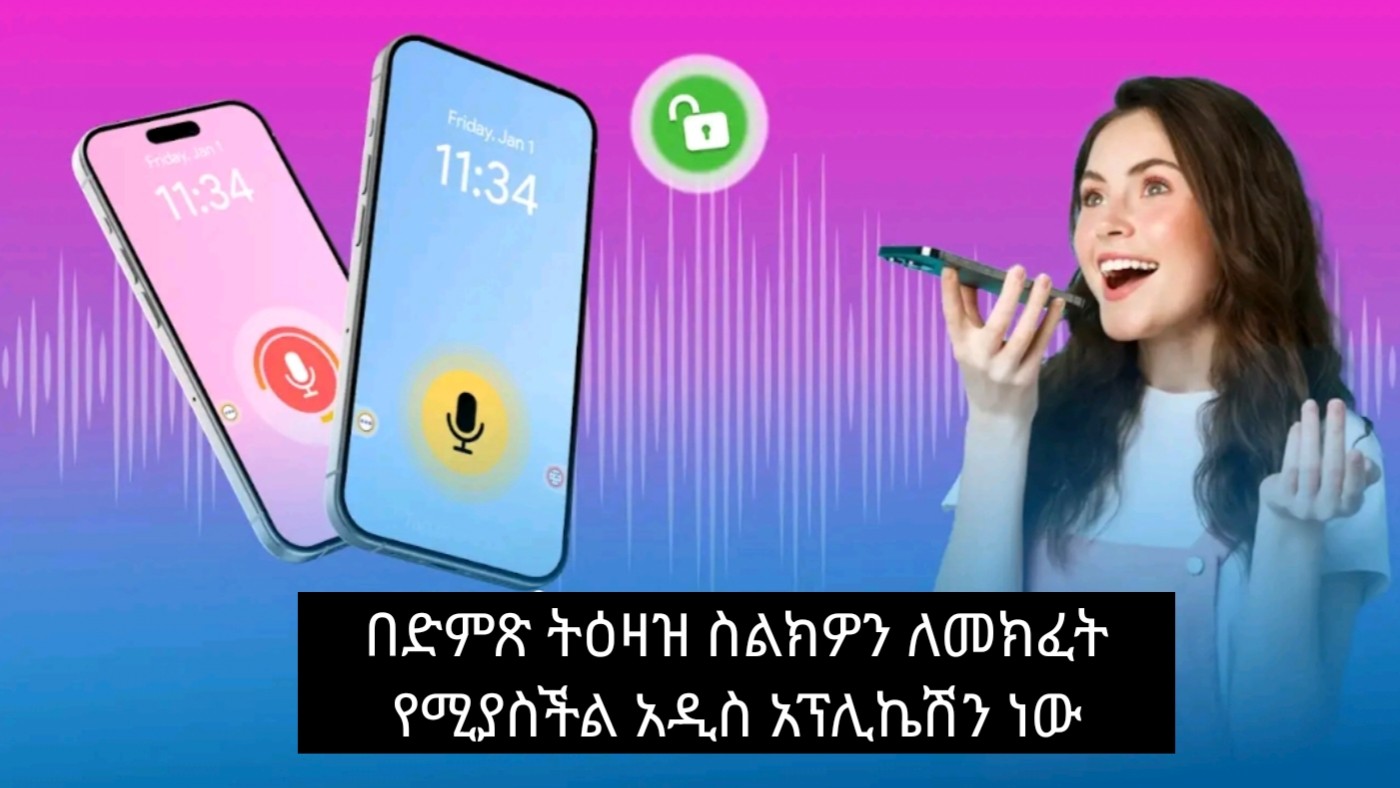
    Voice Screen Lock Apps : Unlock Screen With Voice Command is an amazing new application which allows you to unlock your phone using voice command. Speak and unlock your device using your voice set password.

    You use different lock screen with Different Pattern through secure your data or private or sensitive data. You wants totally different lock screen also this work with your voice. So your wish is complete.

    Voice Screen App Lock App application through you gets totally new style Lock screen just you speak your password and open your lock. This is the Best Screen Lock application which is also very fun to use.

    Unique Voice Screen Lock is a new and very unique lock way to Lock/Unlock your phone device. If you wish to have a unique voice lock screen option on your phone device then this is the best application to have it. It is very easy and simple to use and very easy to setup your decent Voice Lock Screen password. Show your friends and family members the new style of unlocking your device through your voice command and voice control.

    Pin Screen Lock :-
    An amazing collection of wallpapers for a Pin Screen Lock. The all new latest pin lock screen is here to give your phone a ravishing look. If you want to get rid of the conventional boring Screen locks, you can refresh the look of your phone by downloading this free of cost application that is pin lock screen.

    Pin Screen Lock is compatible with almost every android device. Its also tested on various android devices i.e android tablets and android based mobiles phones. All the actions can be performed very easily without any confusion.

    Pattern Screen Lock :-
    Pattern Lock Screen is a cool, secure and customizable Lock Screen App for free with various Beautiful Wallpaper.

    This Pattern Screen Lock app shows and displays real-time clock and date. Set beautiful pattern design on your lock screen with an easy password. Gesture Lock Screen app gives you pattern lock screen high security. In this Smart Lock Pattern app password pin and pattern screen off and pattern lock feature is available free.

    Time Screen Lock :-
    Here comes Screen Lock – Time Password (Dynamic Password) for the rescue.You can make your Phone Current Time its lock screen password.And time changes every minute, so does the password too, so no one can even guess it.

    β˜… CONTACT US β˜…
    Queries, Feedback’s & 24 X 7 Support margostroub022@gmail.com.

    INSTALL